
FreeCell Daily Deal
Saved in this browser
FreeCell Wins and Records
0
Wins
—
Best time
—
Fewest moves
Cleared deals
Wins, best time, fewest moves, and completed deal numbers are saved in this browser only. They do not sync across devices. Clearing site data or the local record deletes these stats.
This cannot be undone. Clear the record stored in this browser?
A Daily Deal to Play, Review, and Replay
The daily deal uses the UTC date to give players the same starting layout, with independent moves and progress. Replay today's deal here, or keep its number to play it later on the main table. Below, historical daily deal 801308 shows an opening, a highlighted hint, and a position after auto-collect. Use it to compare two ways of uncovering the ace of diamonds. These screenshots are examples, not today's fixed deal number.
Choose Today's Deal and Compare Your Moves
Check the daily number
The number beside the title identifies the daily deal. Use the copy button to save it or send it to a friend. You cannot enter a different number here; Other Deals opens the main table. Players opening the page on the same UTC date get the same starting layout, but their moves and saved progress are separate.
Move by the usual FreeCell rules
Click or tap a card and its destination, or drag it directly. Build columns down in alternating colors. Each free cell holds one card; an empty column accepts any rank, not just a King. Runs must fit the available move limit. To win, collect all 52 cards in the four foundations, building each suit from Ace to King.
Replay or return later
Within the same UTC date, reopening this page in the same browser can restore your saved daily position, move count, elapsed time, and available Undo history. Replay restarts today's number and resets those values without deleting stats. Reopen or refresh after the UTC date changes to load that date's deal instead of yesterday's progress.
Compare routes through the same deal
Try your own moves, then use Undo or Replay to change the order in which you set cards aside. Hint highlights a suggestion before a second click plays it. Compare cards uncovered, cells occupied, and ways to release the stored cards, not just the move count. For the examples below, open deal 801308 and select Replay first, then select Auto once for the third example.
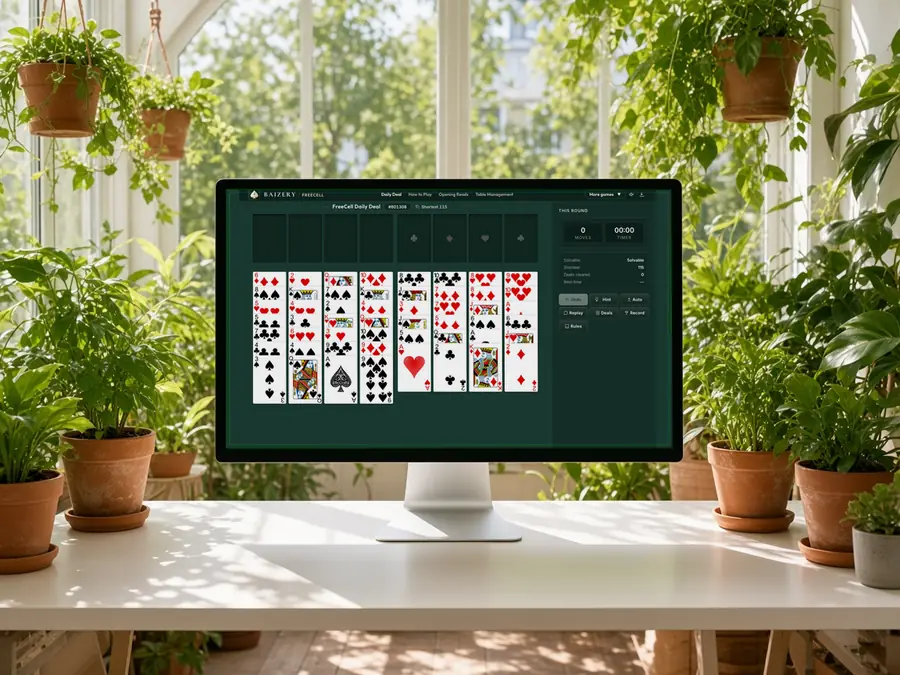
Deal 801308: Two Aces Are Ready to Collect
Count columns from left to right. Column 3 ends with the ace of spades; column 5 ends with the ace of hearts. The King of diamonds blocks the club ace in column 7, while three cards block the diamond ace in column 8.
Compare the cards blocking each ace. The spade and heart aces can go straight to their foundations without using a free cell. Reaching the diamond ace requires moving the 2 of diamonds, Jack of hearts, and 6 of clubs, in that order. Collecting the two exposed aces also makes the 9 of clubs in column 3 and the 5 of spades in column 5 available.
Keep a clear starting point. Save the number and distinguish your first attempt from later replays, noting whether you used Hint or Auto. A time or midgame screenshot alone cannot show where your route changed. These two aces are immediately collectible, but that does not mean every daily deal should begin by collecting aces or that the opening is solved.
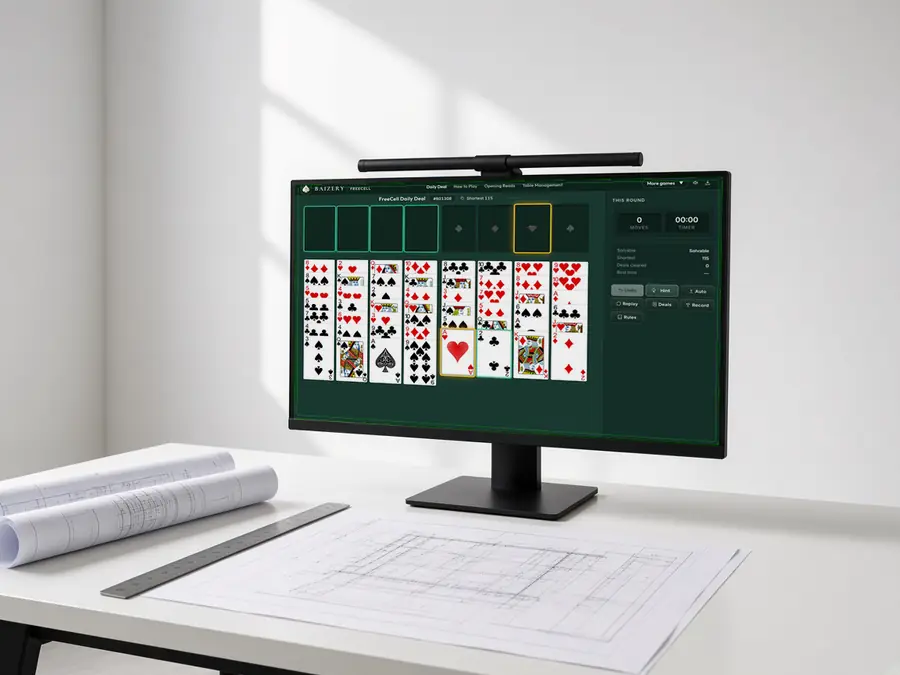
Legal Moves Can Leave Different Positions
The screenshot highlights the ace of hearts in column 5 and its foundation. The move count is still 0: the hint has not been played. The 2 of clubs in column 6 and the open free cells are also legal destinations for that ace.
Compare two legal moves. Collecting the heart ace exposes the 5 of spades in column 5 without occupying a cell. Moving it onto the 2 of clubs in column 6 exposes the same 5 but adds a card to column 6. Both moves are legal, but they leave different positions. A green destination means the card can go there, not that every landing spot has equal value.
Use the hint to check your reasoning. Decide what your move should uncover, then compare that goal with the highlighted origin and destination. Click Hint again to play its suggestion, or clear the selection and move a card yourself. This image records one suggestion in a historical position; today's deal or another calculation need not produce the same step. Hints do not guarantee the shortest route.
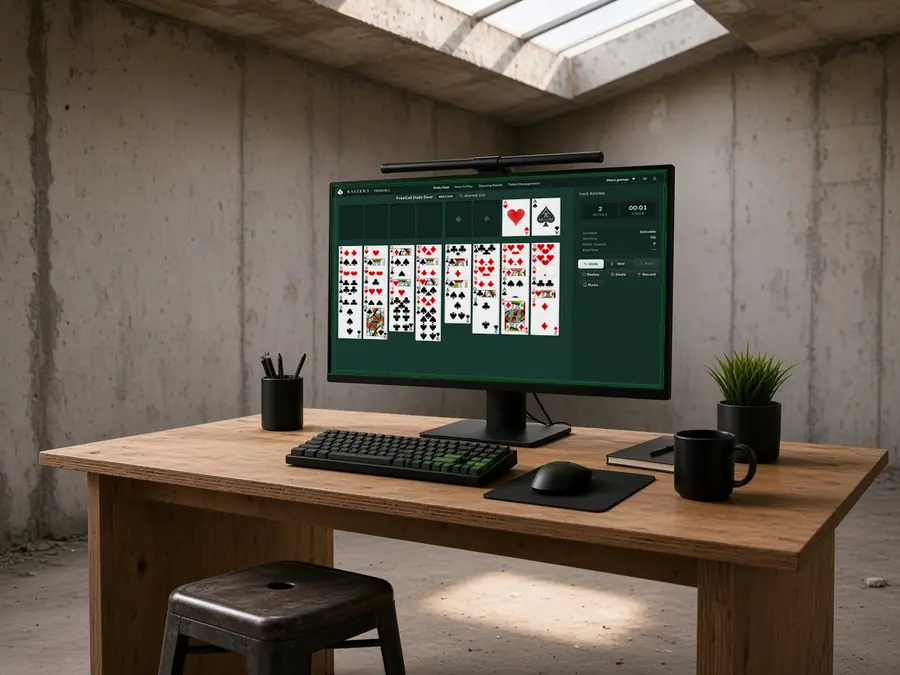
One Extra Move Can Save a Free Cell
From the start of deal 801308, select Auto once. It collects the spade and heart aces, giving the pictured position at 2 moves. To reach the diamond ace in column 8, you can use existing landing spots or put its blocking cards directly in free cells.
Six moves, one occupied cell. Move the 2 of diamonds from column 8 onto the 3 of spades in column 1. Move the Queen of spades from column 2 onto the King of diamonds in column 7, then put the newly exposed Jack of hearts from column 8 on that Queen. Store the exposed 6 of clubs in one cell, collect the diamond ace, and collect the 2 of diamonds from column 1. Six single-card moves leave only the 6 of clubs in a cell.
Five moves, two occupied cells. Alternatively, put the 2 of diamonds, Jack of hearts, and 6 of clubs in three cells, then collect the diamond ace and the stored 2. That takes five moves but leaves the Jack and 6 in two cells. Both routes collect the same cards. Compare the move count with the space left for later moves; these are partial routes, not complete solutions. The stored cards still need a way out.
FreeCell Daily Deal FAQ
Is the daily deal free? Do I need an account?
It is free to play in your browser, with no download or sign-up. Numbered deals, Undo, Hint, and Auto are available without a paid upgrade. There are no points, season rewards, or paid unlocks.
Which time zone determines the daily deal?
The deal follows the UTC date, which changes at 00:00 UTC. After that point, reopening or refreshing loads the new date's deal. The corresponding local time depends on your time zone; it is not necessarily your local midnight.
Does everyone opening it on the same day see the same cards?
The same UTC date gives the same number and starting layout, but later positions depend on each player's moves. A browser with a save for that day resumes its own progress, so two returning players may see different positions. Check the number and select Replay before comparing openings.
Are daily deals chosen by difficulty? Can numbers repeat?
The UTC date determines the number, skipping known unsolvable deals. It does not select an easy, medium, or hard category, and different dates are not guaranteed to have unique numbers. A solvable starting layout also does not mean every route can finish the game.
Will an open tab automatically redeal at midnight UTC?
No. An open tab keeps its current position rather than replacing it midgame. Refreshing or reopening after the UTC date changes selects that date's number. Copy the old number first if you want to replay it later.
Can I resume after closing the page? Is progress shared with the main table?
Within the same UTC date, the same browser can restore the saved daily position, move count, elapsed time, and available Undo history. The daily and main tables keep separate current saves; opening the same number on the main table does not transfer your daily position. Progress does not sync across browsers or devices.
Can I return to an unfinished deal from yesterday?
If you kept the number, open it on the main table to replay the same starting layout. The daily page has no date-based archive and does not retain each day's unfinished position for long-term recovery. Reopening an old number is not the same as resuming yesterday's position.
How do I share a particular day's deal for someone to play later?
Send its number or a main-table link such as /?deal=801308. A daily-page link opens the deal for the UTC date when your friend visits it. A numbered link identifies the deal only; it does not send your progress, time, or stats.
Does clicking Hint move a card immediately?
The first click calculates and highlights a suggestion. Click again while it remains selected to play it. Hint evaluates the current position and does not guarantee the shortest solution. If that position is unsolvable, use the available Undo history or Replay to try a different route.
Does Auto complete the daily challenge for me?
No. It collects cards that currently fit the foundations without rearranging the remaining columns or guaranteeing a later solution. Each collected card adds a move, but one Undo restores the position before the entire auto-collect batch.
What do Replay and Other Deals reset?
Replay restores the current daily number's starting layout and resets moves, elapsed time, and Undo history without deleting stats. Other Deals returns to the main table; it does not choose a random deal on the daily page. Once play has begun, both actions ask for confirmation.
How do daily wins count? Is there a daily ranking?
The daily and main tables share this browser's stats. Wins accumulate, while a completed number appears only once in the completed-deals list. Best time and Fewest moves cover all your completed deals, not just today or one number. There is no public ranking or separate category for results achieved with Hint or Auto.