
FreeCell Online
Saved in this browser
FreeCell Wins and Records
0
Wins
—
Best time
—
Fewest moves
Cleared deals
Wins, best time, fewest moves, and completed deal numbers are saved in this browser only. They do not sync across devices. Clearing site data or the local record deletes these stats.
This cannot be undone. Clear the record stored in this browser?
FreeCell Rules and Worked Examples
Every card is visible in FreeCell. The challenge is uncovering the cards you need without using up their landing spots. Play a numbered deal or the daily deal here for free, with no download or sign-up. The guide below covers the controls, then uses deals 1, 42, and 7 to compare specific moves and free-cell costs. Follow the links for the full rules, opening decisions, and sequence management.
Choose a Deal, Move Cards, and Finish the Game
Open a deal
Click the deal number beside the title, enter an integer from 1 to 1,000,000, and select Go. The same number gives the same starting layout. New picks a random deal; Replay restarts the current number. Begin each worked example from its starting layout. For deal 7, select Auto once first.
Select a card and its destination
Click or drag with a mouse, or tap or drag on a phone. You can move an exposed bottom card or an ordered run at the bottom of a column. Select a run by its first card. Legal destinations light up; click or tap one to move. A free cell holds one card. An empty column accepts a single card of any rank.
Build columns and foundations
Build down in alternating colors across the eight columns: a 6 of spades can go on a 7 of hearts. To win, move all 52 cards to the four foundations, building each suit from Ace through King. Ordered columns alone do not count as a win. You cannot move foundation cards directly back to the columns; use Undo to revisit a collection decision.
Compare moves with the available tools
Undo restores an earlier position. Hint highlights a suggestion before a second click plays it. Auto collects eligible cards but does not rearrange the columns. Try your own move first, then compare it with Hint. Judge a move by what it uncovers, how much space it uses, and whether the cards you set aside can move out again.
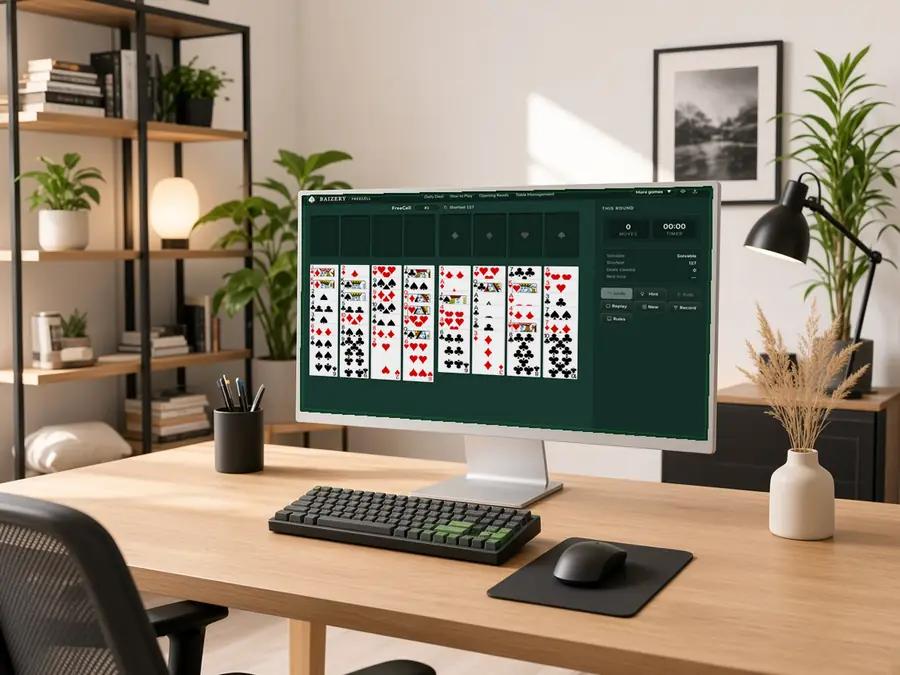
Deal 1: Free Two Aces, Then Reclaim a Cell
Count columns from left to right. In deal 1, column 6 ends with the 3 of diamonds. Directly above it are the 2 of clubs, ace of clubs, and ace of spades. Removing the bottom two cards exposes both aces in turn.
Try these moves. Put the 3 of diamonds in a free cell and the 2 of clubs in another. Move the exposed ace of clubs to its foundation, then the ace of spades. With the club foundation started, collect the 2 of clubs from its cell. After five single-card moves, both aces and the 2 of clubs are in the foundations, and only the 3 of diamonds occupies a cell.
Account for the remaining card. The two temporary cards have a clear release order; the cells are not being used for indefinite storage. The 3 of diamonds still needs a black 4 or progress on the diamond foundation. Exposing two aces does not solve the whole deal. Compare not just how many cards block an ace, but when those cards can leave the cells.
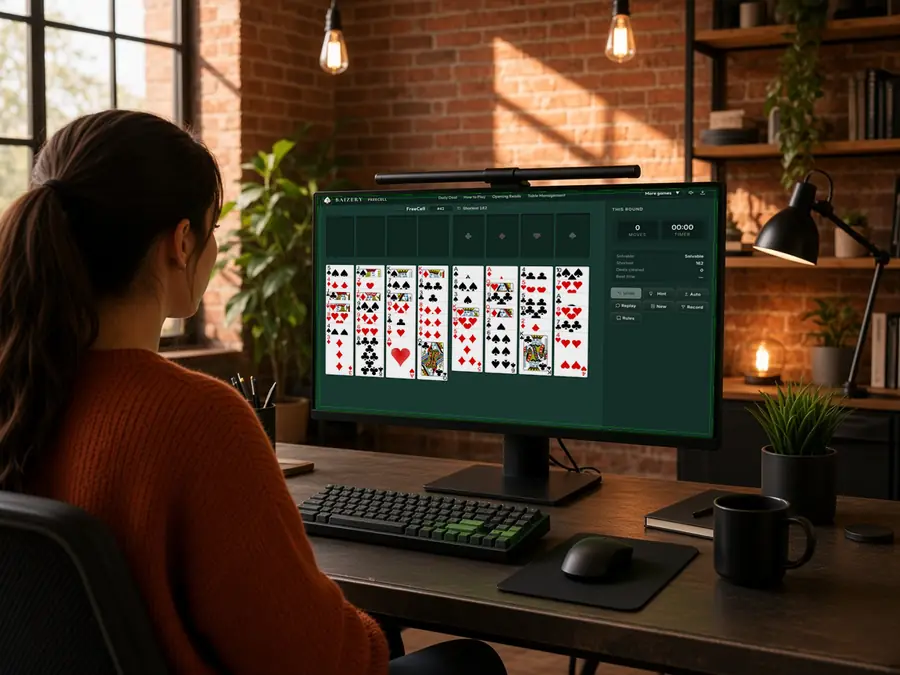
Deal 42: Use the 4 of Spades to Save a Cell
Column 3 in deal 42 ends with the ace of hearts, with the 3 of hearts and 2 of clubs directly above it. Column 1 ends with the 3 of diamonds, blocking the 4 of spades. Move that diamond first to make the black 4 available.
Create a landing spot. Collect the ace of hearts from column 3. Put the 3 of diamonds from column 1 in a free cell, then move the 3 of hearts onto the newly exposed 4 of spades. This exposes the 2 of clubs in column 3 while using just one cell. Putting both threes in cells would expose the same card but occupy an extra cell.
Check the foundation before collecting. The 2 of clubs is now exposed, but its ace is still buried in column 8, so it cannot be collected yet. Before putting that 2 in a cell as well, check what doing so would uncover and whether it helps reach the ace. This is a space-saving comparison, not a complete solution.
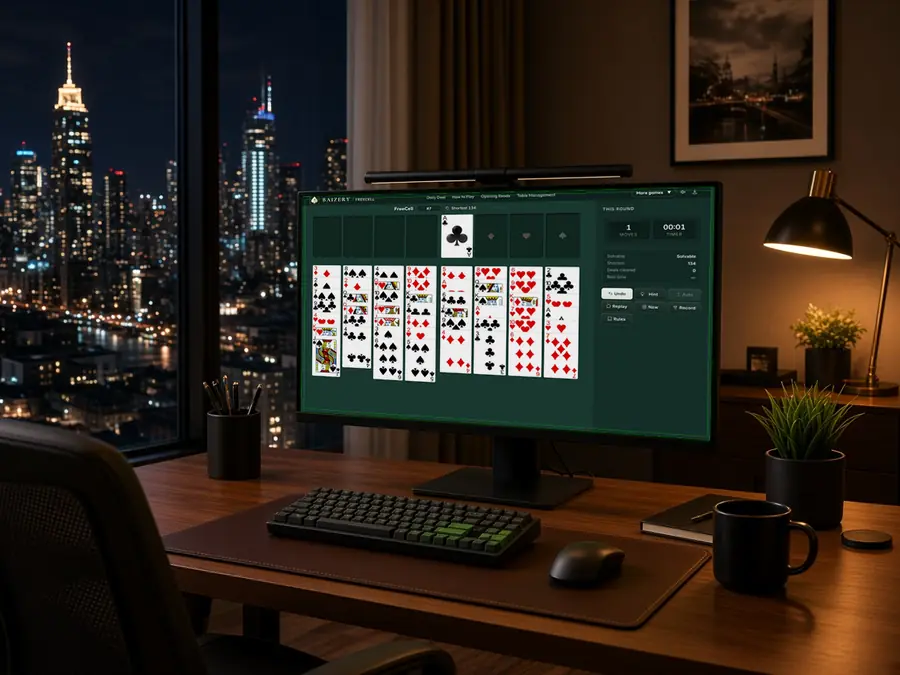
Deal 7: Move the Clubs to Reach the Ace of Diamonds
Open deal 7 and select Auto once. It collects the ace of clubs, producing the pictured position. Column 6 ends with the 3 of clubs, with the 7 of clubs and ace of diamonds directly above it. The exposed 4 of diamonds in column 5 can take the 3.
Move in the right order. Move the 3 of clubs from column 6 onto the 4 of diamonds in column 5. Put the newly exposed 7 of clubs in one free cell, then collect the ace of diamonds. Putting both clubs in cells would also expose the ace but use two cells. Using the 4 of diamonds as a landing spot saves one cell.
Identify what is still blocked. Although the ace of clubs has been collected, the 2 of clubs is still buried in column 8, so the 3 cannot follow it yet. Collecting the diamond ace also leaves three cards in column 6, not an empty column. The stored 7 of clubs still needs a red 8 as a landing spot, or further progress on its foundation.
FreeCell Online: Rules and Controls FAQ
Is FreeCell free? Do I need to download anything or sign up?
It is free to play in a desktop or mobile browser. No app download or account is required, and choosing deals or using the available tools does not require a paid upgrade.
How do FreeCell and Klondike rules differ?
FreeCell starts with every card face up, with no stock or face-down cards to reveal. Each free cell holds one card, and an empty column can start with any rank. Klondike usually includes a stock and face-down cards, and empty columns generally require a King or a run headed by one. Do not carry those restrictions over to FreeCell.
How can a friend play the same deal? When does the daily deal change?
Share the deal number and open it separately to compare the same starting layout. Copying the number does not share your progress. The daily deal follows the UTC date, not midnight on each device. Save its number to replay it here later. There is no live multiplayer mode or public leaderboard.
Why can't I move a run even though its colors and ranks are correct?
The run must be at the bottom of a column, its destination must be legal, and its length must fit this table's limit for the available free cells and empty columns. An empty destination cannot also count as temporary workspace. Use the highlighted legal destinations. If the run is too long, move it in shorter sections or free more space first.
Have I lost if all four free cells are full?
Not necessarily. Look for an exposed card that can move onto another column or a foundation, or use an empty column to release a cell. Full cells mean less room to maneuver, not proof that the position is lost. Conversely, having a legal move does not guarantee that the deal can still be completed.
Why can a Solvable deal have an unsolvable current position?
The label beside the deal number describes the starting layout. Hint evaluates the position after your moves. A solvable deal can be played into a position with no solution. Use the available Undo history to revisit an earlier decision, or select Replay to start that number again.
How do I play a hint? Is it part of the shortest solution?
The first click highlights the suggested origin and destination. Click Hint again while that suggestion remains selected to play it, or make your own move instead. The suggested route is not guaranteed to be unique or shortest. Compare what it uncovers and how much space remains, rather than just copying its start and end points.
Will Auto solve the rest of the deal?
No. Auto repeatedly collects cards that currently fit the foundations. It does not rearrange the columns or guarantee that the resulting position is solvable. If an eligible card is still needed as a landing spot, arrange those moves first. One Undo restores the position before the entire auto-collect batch.
Can I take cards back from foundations? How does Undo affect the move count?
You cannot drag foundation cards back to the columns, but you can restore an earlier position within the available Undo history. Undo restores the cards and move count, not the elapsed time. Moving a whole run counts as one move; Auto adds one move for each card collected.
How do Replay, New, and refreshing the page differ?
Replay restores the current number's starting layout. New selects a random number. Both reset this deal's moves, time, and Undo history without deleting saved stats. Refreshing normally restores the progress saved in this browser rather than restarting. Once play has begun, dealing again asks for confirmation.
How is Shortest different from my Fewest moves record?
Shortest refers to the numbered deal's starting layout, not the moves remaining in your current position or a forecast of the Hint route. Fewest moves is your best completed result saved in this browser. Compare the same deal number and remember that a run counts as one move while Auto counts each collected card.
Where are progress and stats saved? Will they sync to my phone?
They are saved in the current device's browser, without an account or cross-device sync. Stats include wins, best time, fewest moves, and completed deal numbers. Clearing site data may delete both progress and stats. Clear local record removes only the stats; it does not redeal the current game.